Battery powered smart locks make it easier to upgrade your front door without hardwiring or constant key juggling. The best models balance reliable access, strong app control, and long battery life.
In this roundup, we focus on practical features that matter most for everyday use, from fingerprint entry and Wi-Fi support to auto-lock, backup access, and compatibility with your door setup.
Best 10 Battery Powered Smart Locks Picks for 2026
Contactless Biometric Security
Wyze Palm Lock Palm Vein Smart Deadbolt
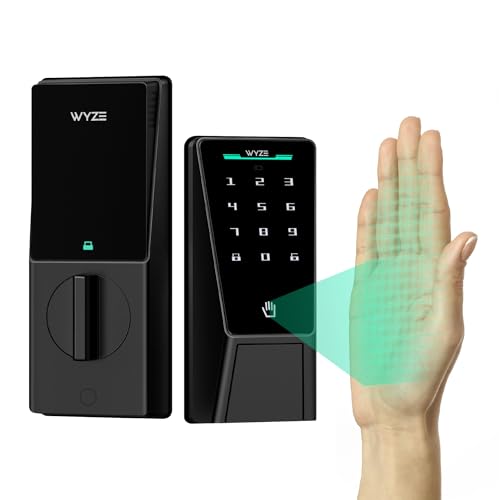
- Palm vein recognition for touch-free entry
- Dual-battery system with emergency USB-C charging
- Wi-Fi, keypad, key backup, and auto-lock
Best For: Households wanting a biometric smart lock with strong backup access
All-in-One Front Door Set
Philips WiFi Keypad Deadbolt with Handle

- Built-in Wi-Fi with no hub required
- Fingerprint access plus flexible PIN options
- Includes matching handle set and auto-lock
Best For: Shoppers wanting a complete smart lock and handle set
Long-Run Everyday Access

- Six unlock methods including fingerprint and app
- Built-in Wi-Fi with no bridge required
- Up to 8 months of battery life claimed
Best For: People who want flexible unlocking and simple remote control
Extended-Range Smart Home Control
ULTRALOQ Bolt SE Wi-Fi Smart Lock

- 7-in-1 access with fingerprint, code, app, and voice
- Built-in Wi-Fi plus Matter over Thread support
- Up to 18 months of battery life claimed
Best For: Smart-home buyers who want Matter support and long battery life
Rechargeable Wi-Fi Deadbolt

- 6 access methods with fingerprint and keypad
- Up to 1 year of battery life on rechargeable pack
- Wi-Fi and app tools for guest access management
Best For: Families wanting a connected deadbolt with long battery life
eufy Smart Lock E31

- 10,000mAh battery lasts up to 14 months
- Fingerprint, app, keypad, key, and voice access
- Works with Apple Home, Google Home, Alexa, and SmartThings
Best For: Smart-home households needing long battery life and ecosystem support
Wi‑Fi Remote Control Pick
Philips Smart Lock Built-in WiFi Deadbolt

- Built-in Wi‑Fi for remote app control and alerts
- 4 unlock methods including key, passcode, app, and voice
- 8 AA batteries with up to 6 months of use
Best For: Homeowners who want app control, voice support, and long battery life
Fingerprint Speed Pick
Wyze Auto-Lock Bolt v2 Fingerprint Smart Lock

- 0.5-second fingerprint unlock with AI learning
- Built-in Wi‑Fi app control plus keypad and key backup
- 8 AA batteries and USB-C emergency power support
Best For: Busy households that want quick fingerprint access and backup entry options
Flexible Access Pick
Philips Wi‑Fi Smart Deadbolt Lock

- Five unlock methods including fingerprint and voice
- Built-in Wi‑Fi remote control with no hub needed
- Up to 100 passcodes plus scheduled or one-time codes
Best For: Families and hosts who need flexible access and remote code management
Contactless Biometric Security – Wyze Palm Lock Palm Vein Smart Deadbolt
If you want battery powered smart locks that focus on speed and security, the Wyze Palm Lock stands out with contactless palm vein recognition, Wi-Fi control, and a keypad backup. It’s built for everyday front-door use, with auto-lock, weather resistance, and a dual-battery setup designed to reduce lockout risk.
Best For: Homeowners who want a biometric smart lock with touch-free access and strong backup options.
Pros:
- Palm vein recognition offers contactless biometric unlocking.
- Dual-battery system includes a main battery plus emergency backup support.
- Wi-Fi access works with Alexa and Google Assistant.
- Includes keypad access, mechanical key backup, and anti-peep code protection.
Cons:
- Biometric palm unlocking may be more than some households need.
- Dual-battery and emergency charging features add complexity.
- Requires app-based setup and management for full smart features.
The Wyze Palm Lock is a strong pick if you want a modern, security-first lock with multiple ways to get in and built-in safeguards against dead-battery headaches. Its mix of contactless biometrics, smart alerts, and backup entry options makes it well suited to busy front doors.
All-in-One Front Door Set – Philips WiFi Keypad Deadbolt with Handle
For shoppers comparing battery powered smart locks, the Philips WiFi Keypad Deadbolt with Handle offers a practical all-in-one setup with built-in Wi-Fi and app control. It combines fingerprint access, flexible passcodes, and a matching handle set, making it a straightforward upgrade for a front door.
Best For: Buyers who want a complete smart lock and handle set with app-based remote access.
Pros:
- Built-in Wi-Fi means no hub or bridge is required.
- Supports fingerprint access plus permanent, one-time, periodic, and recurring PINs.
- Includes a matching handle set for a complete front-door package.
- Auto-lock can be set from 0 to 180 seconds in the app.
Cons:
- Batteries are not included.
- Designed for right-opening doors by default, so left-opening doors need resetting.
- Wi-Fi performance depends on router proximity and surrounding interference.
This Philips lock is a good fit if you want a simple, connected entry system without buying separate hardware. Its combination of remote app control, fingerprint access, and multiple code types makes it especially useful for shared homes or guest access.
Long-Run Everyday Access – eufy Security Smart Lock C220
The eufy Security Smart Lock C220 is a practical choice in battery powered smart locks if you want multiple ways to get in and built-in Wi-Fi control. It adds fingerprint entry, app access, keypad use, and voice support, plus a long battery claim that helps reduce maintenance.
Best For: Users who want flexible unlocking methods and straightforward app control on a front door.
Pros:
- Six ways to unlock, including fingerprint, app, keypad, key, Apple Watch, and voice.
- Built-in Wi-Fi allows remote control without a bridge.
- Claims up to 8 months of battery life with 8 AA batteries.
- BHMA Grade 3 certified and IP53 waterproof for durability.
Cons:
- Battery life depends on usage frequency.
- Uses 8 AA batteries, which is more than some locks.
- Best known for utility rather than premium smart-home depth.
The C220 focuses on convenience and coverage: plenty of entry options, easy installation, and app-based remote access. If you want a dependable everyday smart deadbolt with simple smart-home integration, it’s a solid pick.
Extended-Range Smart Home Control – ULTRALOQ Bolt SE Wi-Fi Smart Lock
Among battery powered smart locks, the ULTRALOQ Bolt SE is built for users who want broad access options and long battery life. It combines fingerprint entry, code sharing, built-in Wi-Fi, and Matter over Thread support for a more flexible smart-home setup.
Best For: Smart-home users who want Matter compatibility, long battery life, and multiple access methods.
Pros:
- 7-in-1 access includes fingerprint, passcode, app, web portal, voice, eKey sharing, and mechanical keys.
- Built-in Wi-Fi supports remote access without a hub.
- Matter over Thread compatibility works with Apple Home and other Matter ecosystems.
- Claims up to 18 months of battery life and includes auto-lock.
Cons:
- Matter features require a compatible Thread border router.
- Supports 2.4 GHz Wi-Fi only.
- Door sensor is not included.
This lock is a strong option if you want a feature-rich deadbolt that can fit into a modern smart-home routine. Its long battery claim, broad access methods, and Matter support make it especially appealing for connected households.
4-in-1 Biometric Knob Lock – Fast Fingerprint Entry
If you want battery powered smart locks for a bedroom, home office, or apartment door, this biometric knob keeps things simple with fingerprint, password, IC card, and backup key access. It is designed for quick keyless entry, and the fingerprint reader is built to recognize prints in under a second for everyday convenience.
Best For: Indoor doors where you want basic smart access without wiring or app setup.
Pros:
- Supports 4 access methods: fingerprint, password, IC card, and 2 mechanical keys
- Fast fingerprint recognition, with claimed unlocking in less than 0.5 seconds
- Stores up to 100 fingerprints and 50 passwords
- No drilling or wiring required for installation on compatible wooden doors
Cons:
- Requires an administrator fingerprint to be registered before first use
- USB port is for emergency power only, not charging the internal batteries
- Designed for indoor use and wooden doors within the stated thickness range
Overall, this is a practical choice if you want a straightforward biometric knob instead of a more complex connected lock. It focuses on quick access and easy setup, making it a solid fit for shared indoor spaces.
Rechargeable Wi-Fi Deadbolt – 1-Year Battery Life
For shoppers comparing battery powered smart locks, this Tapo deadbolt stands out for its long battery life and broad access options. It combines fingerprint recognition, keypad codes, Wi-Fi, Bluetooth, voice control, and backup keys, so it can work well for families that want flexible everyday entry and remote management.
Best For: Homes that want a feature-rich deadbolt with remote access and a rechargeable battery.
Pros:
- Offers 6 access methods, including fingerprint, passcode, Wi-Fi, Bluetooth, voice, and keys
- Claims up to 1 year of battery life with the removable rechargeable battery
- Fast fingerprint recognition, listed at 0.42 seconds
- Supports scheduled or one-time guest codes and app-based management
Cons:
- Requires charging via USB-C when the battery needs power
- More feature-heavy than a basic standalone lock
- Best suited to a deadbolt setup rather than a knob-style replacement
This is a strong option if you want a connected lock with remote control and flexible access management. The rechargeable battery and wide compatibility make it especially appealing for busy homes.
Eufy Smart Lock E31 – 14-Month Rechargeable Battery
If you are shopping battery powered smart locks for a main entry door, the eufy Security Smart Lock E31 is built around long battery life and broad smart home compatibility. It supports fingerprint unlock, app control, keypad entry, physical keys, and voice commands, while also working with Apple Home, Google Home, Alexa, and SmartThings through your existing hub.
Best For: Smart homes that want Apple Home support and a long-lasting rechargeable lock.
Pros:
- Up to 14 months of battery life from the 10,000mAh rechargeable battery
- Unlocks with fingerprint, app, keypad, physical key, or voice commands
- Supports Apple Home, Google Home, Alexa, and SmartThings
- Low battery alerts and a power-save mode add convenience
Cons:
- Remote control depends on your hub or home platform setup
- Requires a portable charger to unlock if the battery is fully dead
- More geared toward smart-home users than buyers who want a simple standalone lock
In practice, this lock is a strong match for households that want long battery life plus broad ecosystem support. The rechargeable battery and multiple unlock methods make it a capable front-door upgrade.
Wi‑Fi Remote Control Pick – Philips Smart Lock Built-in WiFi Deadbolt
If you want one of the more straightforward battery powered smart locks for a front door, this Philips model focuses on remote access, keypad entry, and voice control without requiring a separate hub. Built-in Wi‑Fi lets you manage the lock from the Philips Home Access app, while the physical button keypad is a practical touch if you prefer something less finicky than a touchscreen.
Best For: Homeowners who want app-based control, Alexa/Google support, and simple keyed or code access with long battery life.
Pros:
- Built-in Wi‑Fi enables remote lock control, access permissions, notifications, and event history.
- Supports 4 unlock methods: key, passcode, app, and voice with Alexa or Google Assistant.
- Can store up to 100 custom passwords, including permanent, one-time, and timed codes.
- Runs on 8 AA batteries with up to 6 months of life at 20–30 uses per day.
Cons:
- Batteries are not included.
- Requires attention to low-battery alerts so you can replace cells before power runs out.
- Uses a deadbolt format, so fit and installation should be checked against your door first.
Overall, this is a solid pick if you want a battery-powered smart lock that balances remote convenience with familiar backup entry options. Its battery estimate is good for daily use, and the IP54 rating plus wide temperature range make it more practical for exposed exterior doors.
Fingerprint Speed Pick – Wyze Auto-Lock Bolt v2 Fingerprint Smart Lock
The Wyze Auto-Lock Bolt v2 is aimed at buyers who want a battery powered smart lock centered on fast fingerprint entry. It combines a fingerprint scanner with built-in Wi‑Fi app control, a keypad, and backup keys, so it covers both everyday convenience and fallback access if needed.
Best For: Busy households that want fast biometric entry, app control, and a backup plan for dead batteries.
Pros:
- Fingerprint scanner unlocks in about 0.5 seconds and uses AI learning to improve recognition over time.
- Built-in Wi‑Fi supports remote management in the Wyze app.
- Includes 8 AA batteries with up to 8 months of use.
- USB‑C emergency power option can help unlock the door if batteries die.
Cons:
- Batteries are included, but you still need to plan for replacement eventually.
- Heavier build at 1.47 kg may be more than some buyers expect.
- Fingerprint convenience may not suit users who prefer only traditional key access.
This model stands out if speed is your top priority. Between the biometric unlock, the app, and the USB‑C backup power option, it offers a very practical mix of convenience and contingency for everyday front-door use.
Flexible Access Pick – Philips Wi‑Fi Smart Deadbolt Lock
For shoppers comparing battery powered smart locks, this Philips deadbolt is built around flexibility. It supports app, passcode, fingerprint, physical key, and voice unlock, and its built-in Wi‑Fi means you can manage the lock remotely without an extra hub.
Best For: Families or hosts who want multiple unlock methods, remote access, and shareable codes for guests or renters.
Pros:
- Five unlock methods: app, passcode, fingerprint, physical key, and Alexa/Google voice control.
- Built-in Wi‑Fi enables remote locking and unlocking from your smartphone.
- Can create up to 100 custom passcodes plus unlimited one-time or scheduled codes.
- Supports auto-lock from 10 to 180 seconds and Away Mode for extra security.
Cons:
- Batteries are not included.
- Only supports 2.4 GHz Wi‑Fi.
- Voice control requires logging into your own Alexa or Google account and a stable connection.
This is the most flexible option in the group if you need to hand out access often. It fits well for shared homes, rentals, or busy families that want multiple ways in and easy code management from the app.
How We Picked These Battery Powered Smart Locks
We looked for Battery Powered Smart Locks that deliver dependable daily use, simple setup, and the features most buyers actually need. Priority went to models with clear access options, strong smart home support, and battery-conscious designs that won’t become a maintenance hassle.
We also favored locks with a good mix of entry methods, including fingerprint, keypad, app control, and physical backup keys. That combination matters because the best smart lock is the one that fits how your household really comes and goes.
Quick Comparison: What Matters Most
If you want the simplest answer, compare battery life, connectivity, and entry style first. Wi-Fi models are more convenient for remote access, while Thread or Matter-ready options may appeal if you already use a compatible smart home platform. Fingerprint locks are usually the fastest for family use, while keypad models can be more flexible for guests and rentals.
Key Buying Factors for Battery Powered Smart Locks
Battery Life and Power Alerts
Look for realistic battery estimates and low-battery notifications. A lock that lasts months on common batteries is better than one that promises convenience but needs frequent replacements.
Connectivity and Smart Home Compatibility
Built-in Wi-Fi is convenient if you want remote control without an extra hub. If you care about future-proofing, check for Matter or Thread support, plus compatibility with your preferred ecosystem.
Access Methods and User Management
Think about who will use the lock every day. Fingerprint access is great for families, keypads help with codes for guests, and app access works well for owners who want full control from anywhere.
Installation and Door Fit
Measure your door before buying and verify deadbolt or handle requirements. Some Battery Powered Smart Locks are designed for standard front doors, while others are better suited to interior rooms, apartments, or specific hardware styles.
Who Should Buy Which Battery Powered Smart Locks?
Choose a fingerprint-first lock if you want the fastest everyday entry for family members. Pick a Wi-Fi deadbolt if remote access and app control are your top priorities. If you manage rentals, guests, or a shared home, a keypad-friendly model is usually the most flexible. And if smart home integration matters most, look for Matter, Thread, or platform-specific support so the lock fits the rest of your setup.
For most shoppers, the best Battery Powered Smart Locks are the ones that combine reliable access, simple installation, and battery performance you can trust without checking the app every week.